
Instrument manual
Ectocore Guide
Ectocore is an 8 HP Eurorack version of Infinite Digits’ Zeptocore: a stereo sample mangler for slicing breaks, combining effects, sequencing transients, and staying locked to a modular clock.
This guide follows firmware v8.1.0, which adds start-on-demand playback.
Demo
Ectocore streams stereo audio from its SD card and reshapes it in real time. Use the large Break control for immediate variation, select sounds from 16 banks, and move through curated combinations of slicing, gating, filtering, distortion, and other effects.
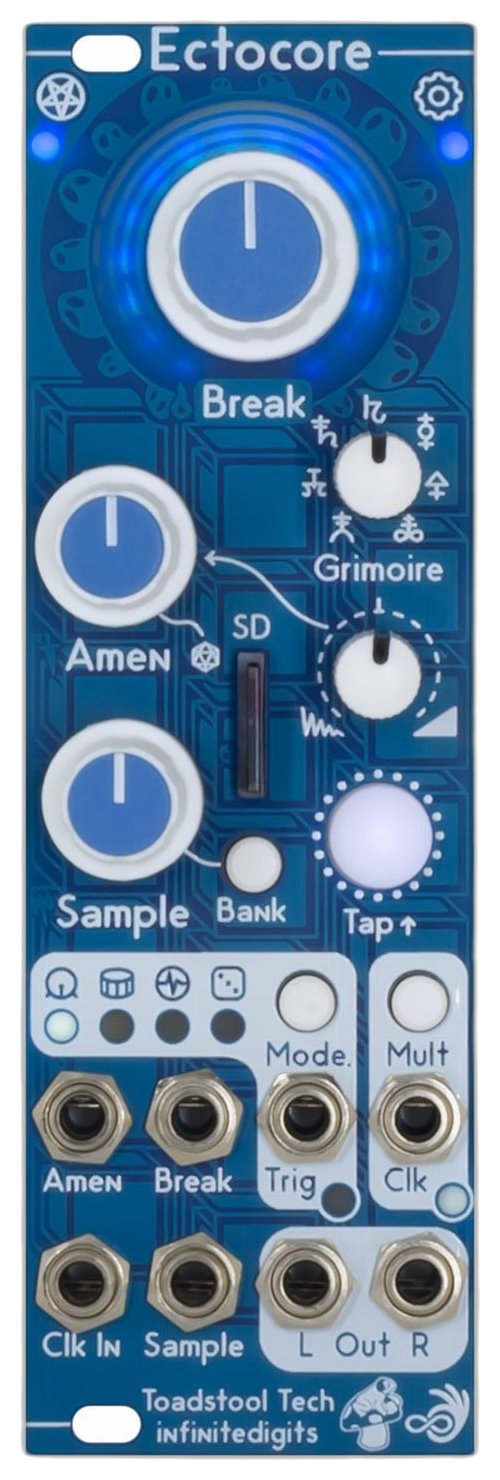
Highlights and effects
- 8 HP Eurorack module.
- Stereo 44.1 kHz audio streamed from SD card.
- 16 sound banks with voltage control over sample selection.
- Seven configurable effect banks combining sixteen effects, selected by the Grimoire control.
- Algorithmic sequencing for generating new sample-slice patterns.
- Transient-specific triggering for kick, snare, and other detected events.
- Clock input and output with synchronized playback.
Source code and schematics
Ectocore is based on the open-source Zeptocore device by Infinite Digits. Explore the canonical
_core source repository
or open the
Ectocore v1.0.1 schematic directly.
Rungling and sequencing
The internal looping random sequencer is inspired by runglers and Turing machines. It can continually generate related slice patterns, balancing repetition with controlled mutation.
Transient sequencing
Ectocore can identify and expose transients so external triggers can address musically useful events such as kicks and snares instead of advancing through a sample blindly.
Stay in sync
Clock input keeps Ectocore aligned with a patch while automatic pitch adjustment matches the sample to the detected tempo. Clock output can pass the synchronized pulse onward to the rest of the system.
In the sample manager’s Settings → Startup playback, choose Wait for clock or button to power up with the sample loaded silently and clock and trigger outputs idle. Press TAP or send the first pulse to CLK IN to start. Play immediately (default) keeps the usual startup behavior. Save the settings to the SD card and restart the module to apply the choice; changing samples or banks does not reapply it.
Once playback starts, the incoming-clock stop/continue setting controls what happens when the clock stops. Start tempo → Fixed BPM sets an initial whole-number tempo from 30 to 300 after a restart; tap tempo and external clock sync still work afterward. Leave it at Default (no override) to keep the usual startup tempo.
Firmware and sample tools
The desktop _core sample manager v8.1.0 edits a project folder or SD card directly. Choose Project → Default samples → Ectocore to download 86 samples across nine banks into a new editable project in Downloads. Follow the default-sample steps to copy the project to a card.
Update the module to v8.1.0 before using newly prepared samples. Current tools save primary audio without stretched companion files; the firmware supplies live granular Time Stretch.
For sample selection from CV, choose Settings → Sample CV mapping → Bank divisions to spread samples across the input voltage range, or 1 V/oct for note-based CV sources. This selects samples rather than changing their pitch. Save the settings to the card and restart the module.
Use the store’s Ectocore firmware selector to choose a v8.1.0 clock and latency build. Choose normal or low latency, with overclocking or non-overclocking; this release has no ultra-low-latency build. The existing quick-start and sample manager remains available for preparing the SD card and managing sounds.
Acknowledgments
Ectocore grew from the open-source Zeptocore platform and a wider community of hardware, firmware, and music-software work. Read the full project history and acknowledgments.